SAML Integration
Overview
The Conduit SAML identity source integration allows customers to add user SSO to Conduit , authenticated by external login SAML providers.
Adding a SAML Integration
To add a SAML integration:
- Navigate to
Administration -> Tenants - Select a tenant.
- Select IDENTITY SOURCES in the Tenant detail page
- Select + ADD IDENTITY SOURCE.
- Select SAML (external login) from the TYPE field
- Add a Name and optional Description for the SAML integration
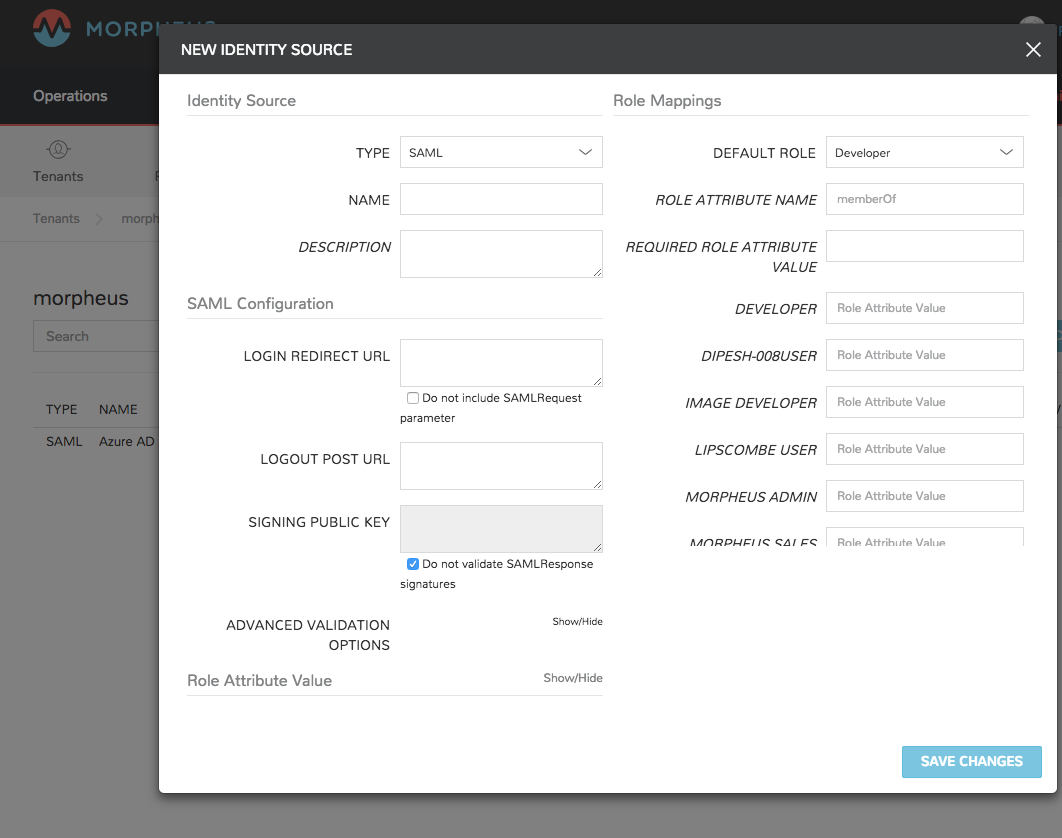
There are 3 sections with fields that need to be populated depending on the desired configuration:
- SAML Configuration
- Role Mappings
- User Attribute Names
SAML Configuration
- LOGIN REDIRECT URL
- This is the SAML endpoint Conduit will redirect to when a user signs into Conduit via SAML.
- LOGOUT POST URL
- The url conduit will post to when a SAML user log out of Conduit to log out of the SAML provider as well.
- SIGNING PUBLIC KEY
- Add the X.509 Certificate public key from the SAML provider.
Role Mappings
- DEFAULT ROLE
- Role a saml user will be assigned by default when no role is mapped
- ROLE ATTRIBUTE NAME
- The name of the attribute filed that will map to conduit roles, such a MemberOf
- REQUIRED ROLE ATTRIBUTE VALUE
- Role attribute value that a user must be assigned/a member of to be authorized, such as group or role in the SAML SP.
The rest of the Role Mapping Fields will be the existing Roles in conduit with a Role Attribute Value field.
User Attribute Names
- GIVEN NAME ATTRIBUTE NAME
- SAML SP field value to map to Conduit user First Name
- SURNAME ATTRIBUTE NAME
- SAML SP field value to map to Conduit user Last Name
- EMAIL ATTRIBUTE NAME
- SAML SP field value to map to Conduit user email address
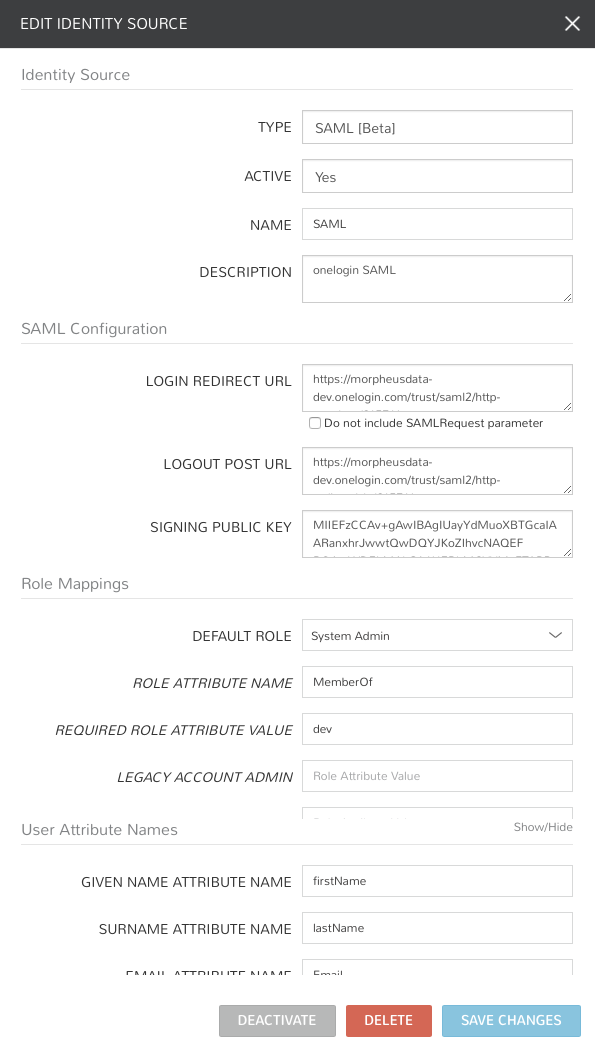
Once populated, select SAVE CHANGES and the SAML identity source integration will be added.
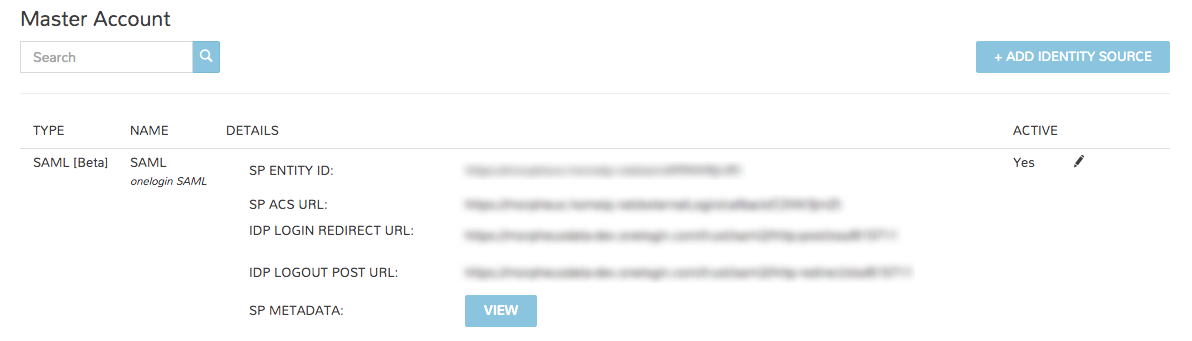
In the Identity Sources section, important information for configuration of the SAML integration is provided. Use the SP ENTITY ID and SP ACS URL for configuration on the external login SAML provider side.
- SP ENTITY ID
- SP ACS URL*
- IDP LOGIN REDIRECT URL
- IDP LOGOUT POST URL
- SP METADATA
Sample Metadata code output:
<?xml version="1.0" encoding="UTF-8" standalone="yes"?><EntityDescriptor entityID="https://someip.com/saml/CDWPjmZt" xmlns="urn:oasis:names:tc:SAML:2.0:metadata"><SPSSODescriptor AuthnRequestsSigned="false" WantAssertionsSigned="true" protocolSupportEnumeration="urn:oasis:names:tc:SAML:2.0:protocol"><NameIDFormat>urn:oasis:names:tc:SAML:1.1:nameid-format:unspecified</NameIDFormat><AssertionConsumerService index="0" isDefault="true" Binding="urn:oasis:names:tc:SAML:2.0:bindings:HTTP-POST" Location="https://someip.com/externalLogin/callback/CDWPjmZt"/></SPSSODescriptor></EntityDescriptor>
Note
Different SAML providers will have different field names and requirements. A onelogin SAML Test Connector (IdP w/attr) was used for the example integration this article.
Onelogin SAML SSO
For Onelogin SAML integration, the following fields are mapped:
- LOGIN REDIRECT URL : SAML 2.0 Endpoint (HTTP)
- LOGOUT POST URL : SLO Endpoint (HTTP)
- SIGNING PUBLIC KEY : X.509 Certificate
- SP ENTITY ID: ACS (Consumer) URL Validator
- SP ACS URL: ACS (Consumer) URL